Changelog
New versions come from the shop where you bought QuadGuide. QuadGuide tells you in its panel when a newer one exists (see Updates).
0.8.0 (2026-11-09)
Draw
-
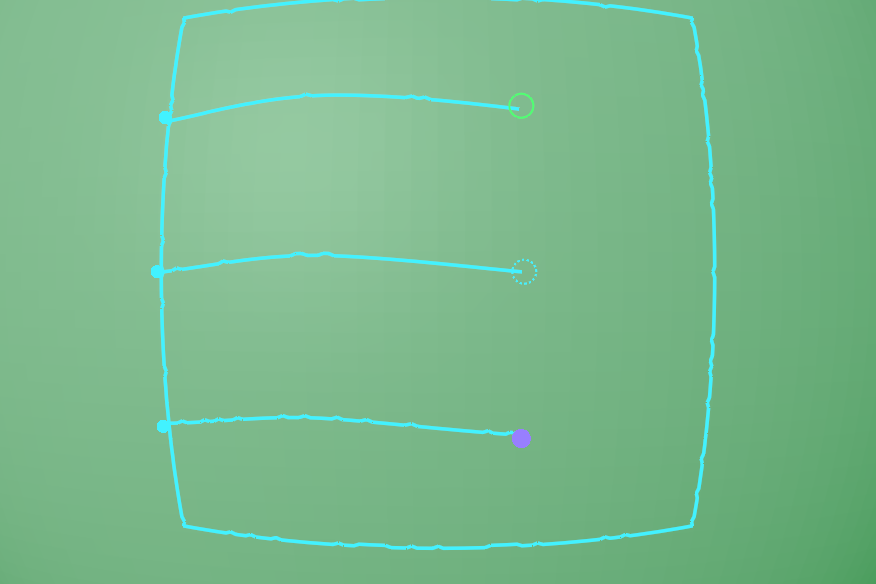
Draw: a line end that meets nothing can be marked to fade into the quads (a dashed ring) or to stop with a pole at its tip (a violet dot): P and click the end. Free Split Loops marks the line it shortens to fade at both ends, and N loose ends no longer counts marked ends.
-
Free and stop line ends: a line end marked free is no longer snapped to a nearby line and fades out into the surface (Fill with Patches continues it to the next line), and a stop end finishes in a single pole exactly where it was drawn.
-
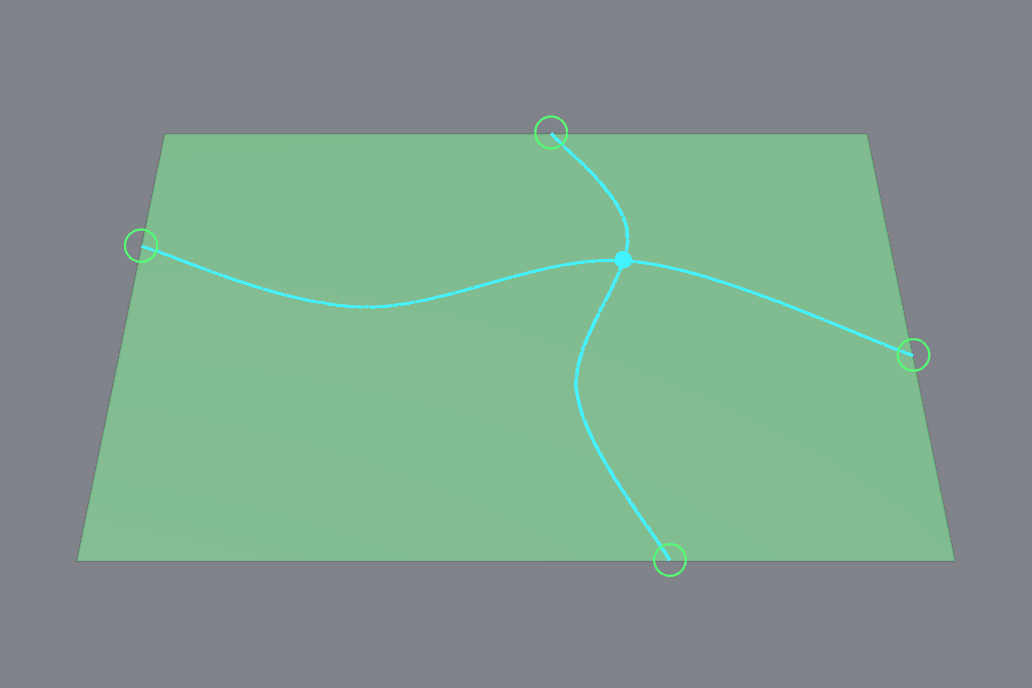
Draw: where two guides cross, or a line end touches another guide without being glued, the remesh puts its junction at the cyan pin Draw shows, so the patches meet where you see them meet. Drawings without such crossings are handed to the engine exactly as before.
-
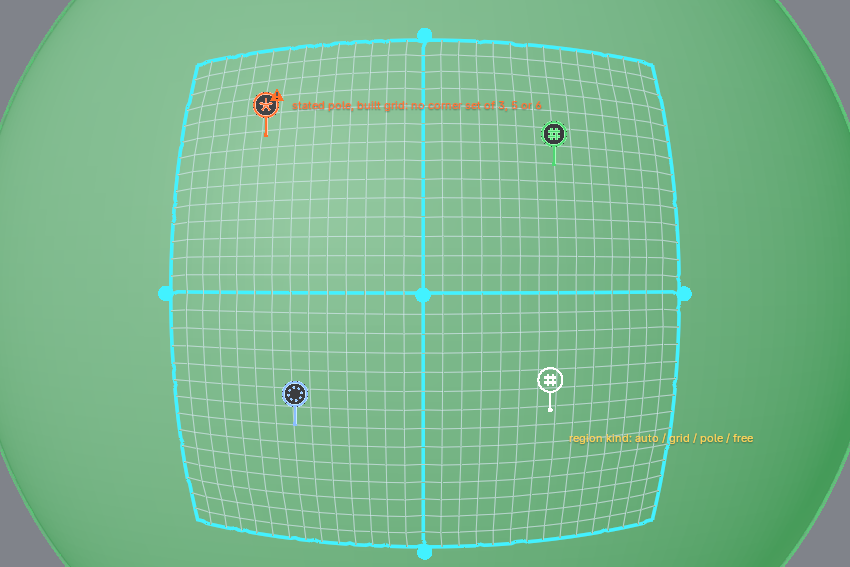
Draw: hold K and click a region to state its kind: grid, pole or free (auto again on the fourth click). A pin with the kind's glyph stands where you clicked and keeps the statement with that region through merges, splits and moved lines; it turns orange, with the engine's reason on hover, when the region is built otherwise, and the panel's engine line counts those statements. Mirror X states the mirrored region too, Ctrl+Z undoes a click, and drawings without statements are handed to the engine exactly as before.
-
Draw: a point in the middle of a guide glued to another guide is a junction in the remesh, as a glued end is.
- Draw: the plan shows the regions the fill will build, including with Mirror X on.
- Sharp corners stay sharp: a drawn triangle's or rectangle's corners land exactly on the drawn points (they were rounded by up to half a quad), in the mesh and in the guides shown on the result.
Fill with Patches
- Fill with Patches gives the same result on every run of the same drawing: the step that decides how many quads each patch gets now runs for up to 60 seconds (it was 10) instead of stopping at whatever it had reached, which on a busy computer changed the result.
- A region the engine cannot fill as patches is reverted to a simpler layout or filled free on its own. The rest of the mesh keeps its patches instead of the whole mesh falling back to the free remesh.
- A short free end in a large region fills that region free, with the line followed, instead of being run on to the next guide.
- A region's stated kind (grid, pole or free) is built by the engine. A pole it cannot build is reported in the result line and in the plan.
- Stop ends: the branches the engine adds at a stop end's pole now end where they meet the mesh boundary, so the quad count lands closer to the count asked.
-
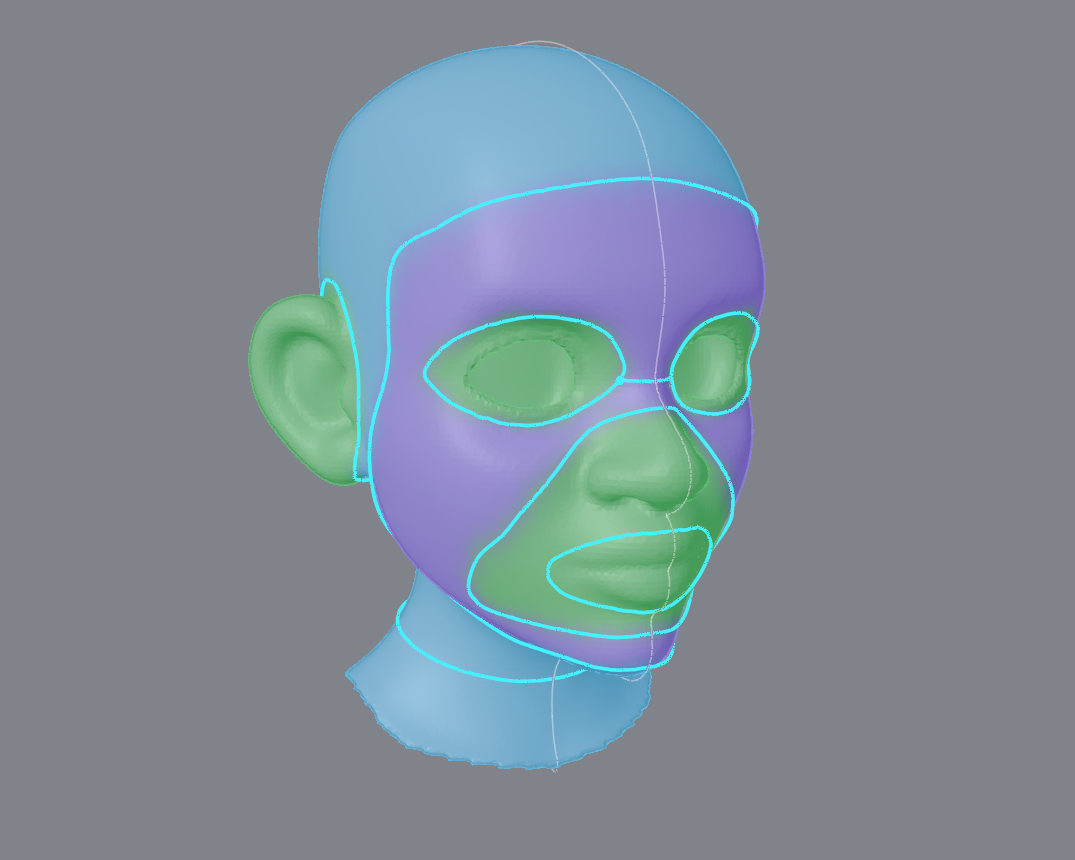
Mirror X with Fill with Patches solves one half of the mesh and mirrors it, and the engine checks the mirrored result. A half that does not fill is tried on the other side, then on the whole mesh.
-
A dense mesh is no longer simplified when that would remove too little, so the layout fills at counts where it failed before.
- Regions refilled at the asked size land much closer to it.
- The guide file the add-on hands the engine is version 3 when a guide carries free or stop ends, a point glued mid-curve or a region statement; older drawings are written exactly as before.
The free remesh
- The free remesh gives the same result on every run too: the extra rounding tries it makes when the count is off ran only if a 3 second clock allowed, so a busy computer could ship a different mesh (the dome of the technical bench: 1666 quads busy, 1529 idle). They now run by the size of the part, the same on every machine, and a try with folded quads never wins over a clean one. Thorough no longer has a clock either.
- The review sheet lists the engine's own measure of the result: worst and mean corner quality, inverted, folded and poor quads, and poles by valence.
No more stalls
- Remesh starts at once on a large mesh: the engine's input is written in a background thread (on 1.2 million faces Blender was held for 8 seconds, now a tenth of a second), and the checks the add-on runs after a change (the refill, the kept patches, the mirror) run without holding Blender; Esc stops them.
- Close Holes and the mesh reads behind Draw and the overlays are many times faster on big meshes (the border of a 1.2 million face mesh in under a second).
- Surfaces to Guides no longer stalls Blender on a large CAD part (12 s to 1.5 s on the housing bench part; a progress bar and the time in the report), and one cut point that was projected onto the wrong triangle is now exact.
CAD parts
- The Surfaces (CAD) panel in one glance: one button, the angle, one status line (surfaces and materials, thin walls) and Details with the border options, Merge Thin, To Guides and Clear Surfaces. Find Again and Update Materials are gone: Prepare Again does both.
- The manual's CAD page has nine bench parts to download and try.
- Known limit, unchanged: a flat meeting a dome at an acute tip (a 25-degree lens corner) still gets a crushed fan of poles at the tip; lower the count on such parts. The fix is on the roadmap.
0.7.0 (2026-11-08)
- Draw, one tool for the guides, replaces the toolbar tools of 0.6: freehand (F), the pen (click, click-drag for a smooth point), line (L), circle (O), and a cut straight through the mesh (a stroke off the mesh); points with handles you drag, scale (S) and turn (R), sharp or smooth (V); any point glued to another guide by dragging it there, a junction that moves as one and bends the other guide; two points connected with Alt + click; relax and tweak brushes (R, T), erase a section (E), delete a guide (X). The keys that do something right now stand bottom left; F1 lists them all. See Draw.
- The guides are stored on the mesh itself, not as curve objects; guides from 0.6 are taken in the first time Draw opens.
- Mirror X while drawing: a guide drawn on one side gets a twin that follows every edit; a guide across the center is made symmetric in itself; an end dragged onto the mirror line merges the guide with its mirror image, and Ctrl + drag pulls a merged point off again. The remesh with Mirror X on is symmetric (Symmetry and Mirror X are one switch).
- The regions between the guides are tinted while drawing, each patch in its own color, feathered at its edges; the points and handle ends are flat markers of a set size on screen (Draw Marker Size in the preferences).
- The panel: Quads, Style, Draw, Remesh and the result at the top; Fill with Patches and the overlays under Options. Guess, Try, the torn-result warning and the Guide the Flow section are gone. The preferences are laid out as labeled rows.
- Gone with the old tools: vertex loops, edge counts on spans, openings, Face Rings, Joint Loops, Holding Loops, Set Edge Count, the Quad Guides menu. The manual for 0.6 stays online: pick it from the version menu at the top of the page.
- The manual rewritten round Draw.
- The tint while drawing is the engine's own plan: a second after a change the engine lays out the patches in the background, and each region shows the grid, pole or ring it will get, with its edge counts. The side panel says what the plan holds ("Engine: 10 grids, 0 poles, 0 rings"); the last plan stays until the next one lands. Fill with Patches then makes exactly what the tint showed.
- The engine is told what Draw knows: which guides meet where, which points are corners, and which guide is the Mirror X twin of which. Junctions and corners in the mesh now land where they were drawn (the guide file is version 2; older files are still read).
- Fill with Patches decides its own layout: the engine owns the patch rules (junction corners, merging, count targets), and the add-on only passes the guides and the settings you set. Before, the add-on tried to second-guess the engine with its own region finder.
- When a patch fill comes out short of the quad budget, Remesh retries the way Update after a moved guide always did, and keeps the better of the two. A rest region without guides is filled at its area, so a face with guides round the eyes and mouth no longer gets a coarse cheek and a dense forehead.
- With Mirror X on, a guide and its twin get the same edge counts, so the mesh is mirrored down to the quad.
0.6.0 (2026-11-03)
- A Guess button next to Style picks Hard Surface, Sculpt / Scan or Character from the mesh itself and says why; the Surfaces (CAD) panel has one Prepare CAD Part button that finds the surfaces and turns them into materials, with the rest under Details.
- Cleaner technical meshes with the Standard shape (hard surface, CAD, scans): where the engine cannot close its edge-flow layout on a part with sharp pockets and slots, the fallback no longer leaves folded patches that invent poles. The Ortlieb cap goes from 91 poles to 30 at 5000 quads, a dome with a pocket from 20 poles to 16 (all at the surface's own corners), both validated on the first attempt and a little faster. The Character and Sculpt presets are unchanged, and so is every organic result.
- Surfaces (CAD): a Curved option under Details splits where two curved faces meet smoothly (a fillet running onto a cylinder), by their curvature. Off by default: right for a part whose fillets are CAD faces, too much for a part tessellated from one freeform surface.
- A Thorough checkbox under Style for Hard Surface: one more rounding of the quad grid is tried and the result with fewer poles kept (the bag cap: 30 to 26 poles, 14 to 21 s).
- Update after moving a guide keeps its speed on technical meshes: the extra work above is for the whole-part remesh, not for the region refill.
- Draw in Guide the Flow works from Edit Mode: it goes back to Object Mode and picks the tool. Before, pressed in Edit Mode, it failed with "Tool 'quadguide.guide_draw' not found for space 'VIEW_3D'" (the guide tools are Object Mode tools; the panel offered the button anyway).
- Drawing works when the guides collection is switched off in the Outliner: QuadGuide turns it back on. Before, the pen failed with "Object 'line.005' cannot be selected because it is not in View Layer".
- CAD meshes with corners a hair apart (two vertices joined by a tiny edge) remesh. Before, some failed with "cross field factorization failed"; the engine now merges such corners.
0.5.1 (2026-10-31)
- The engine's advice shows within seconds, before the wait is over, as markers in the viewport and a line in the status bar. The remesh goes on; Esc stops it.
- When the patches between your lines cannot be made but the free remesh follows every line, the result says "your lines are followed" instead of "your patches were not used".
- New advice, "hole through it", for a region with a handle (the strap loop of a cap): draw a loop round each end of the hole. The "uneven ring" advice now says the part is remeshed free, following your lines.
- Update after moving a guide: only the regions the guide borders (and a band round them) are remeshed, in a few seconds, and the rest of the result is untouched. The viewport tints those faces orange before you press it.
- Report a Problem and Save Report now include your mesh and your guides, so we can repeat what you saw. The tick for them is gone; the panel tells you the mesh is in the zip.
- One engine for macOS, Intel and Apple silicon alike.
- Faster second runs on dense sculpts: the simplified sculpt is reused by the next run, which saves about 5 to 10 seconds on a dense head.
- Guides belong to the mesh they are drawn on. Remesh, the panel, the overlay and Delete All use only the selected mesh's guides, so a scene with several meshes, each with its own guides, remeshes each one as drawn. Switching back to a mesh shows its patches at once.
- Faster on dense sculpts. The demo head with five face loops at 5050 quads took 10 minutes and stopped at the time limit; it now finishes in about a minute.
- Filling open regions works on low-poly meshes with long triangles (a capsule's sides), and no longer waits minutes before giving up.
- Each mesh remembers its settings from its last remesh (the quad count, the preset and the rest): switching to it brings them back.
- A drawing whose free part, most of the mesh, cannot be joined to its patches (a few loops on a face, the rest of the head free) now ends in a clean free remesh steered by your lines, in about 35 seconds on the sample head, instead of a torn result after eight.
- Preferences > Detailed Engine Report: the engine writes where its time goes, for a problem report. Off by default; off, it costs nothing.