Drawing a patch network
With Fill Between on (the default), your guides are the borders of patches, like a curve network in a retopo tool. Where lines meet, they make corners. Each region they enclose is filled as one patch of quads, and the edges along every line follow it exactly.
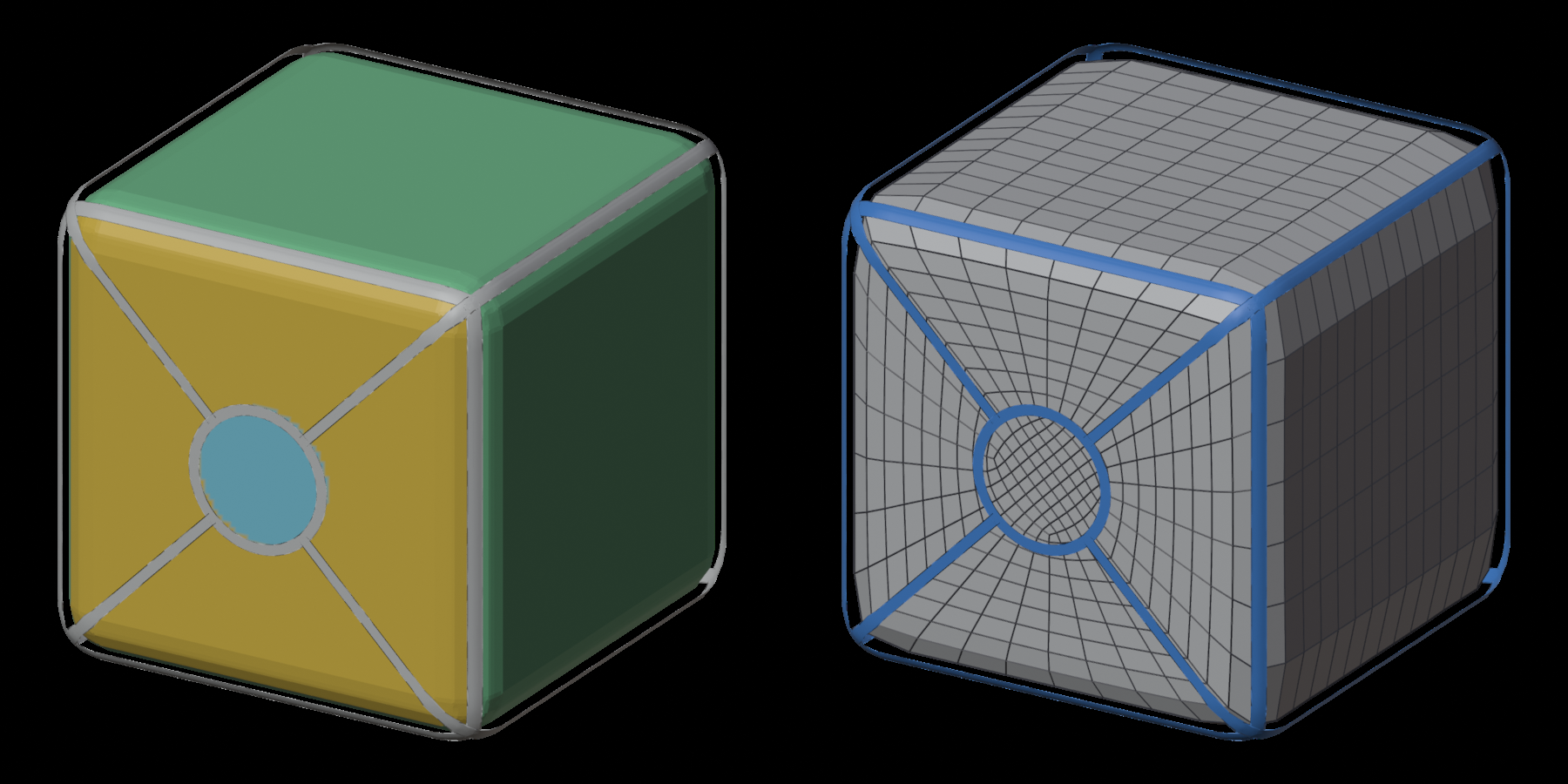
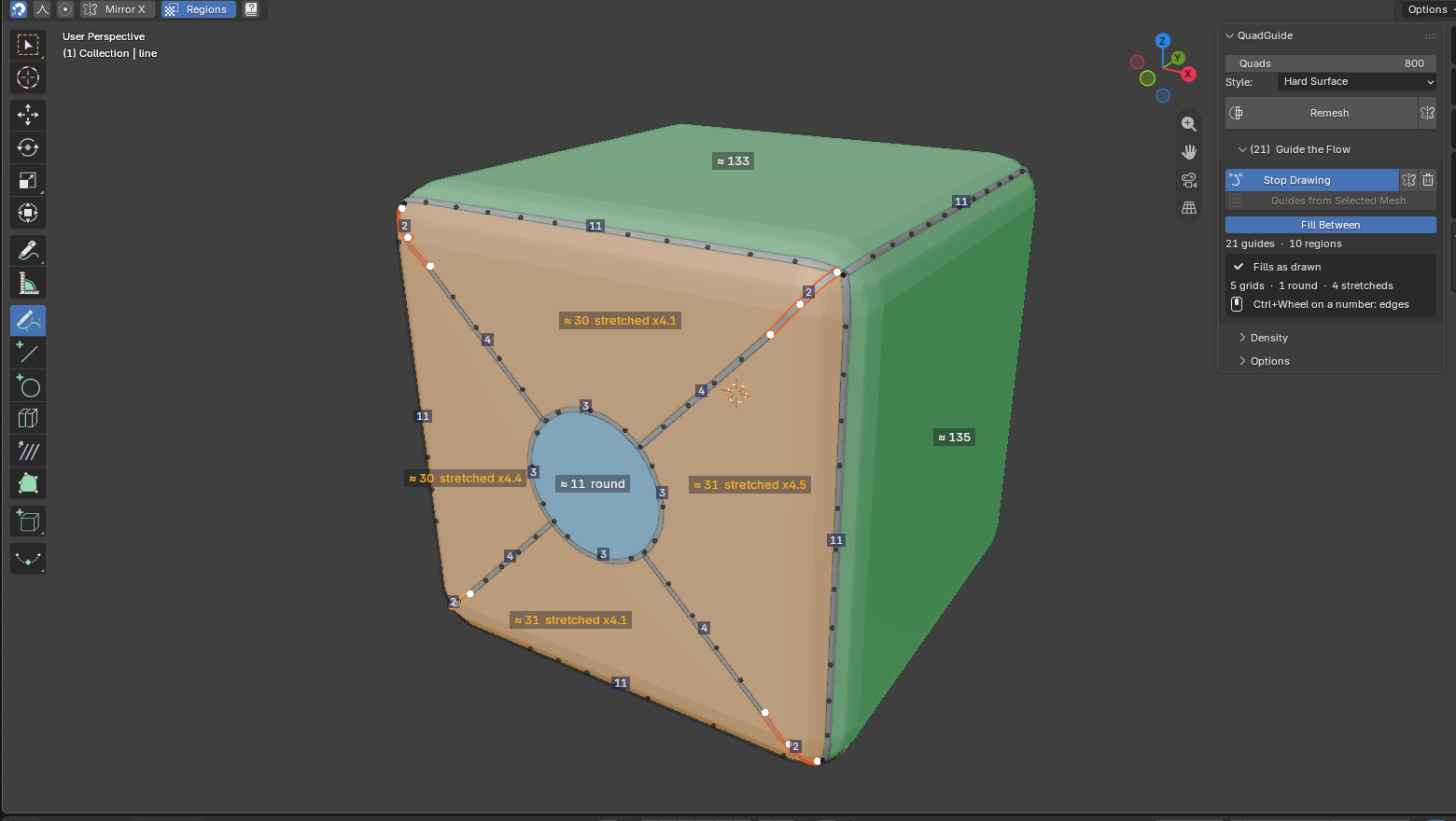
The box: its twelve edges and a round port on the front, its spokes out to the front's corners. Hard Surface, 800 asked, 802 quads. Each face is one grid.
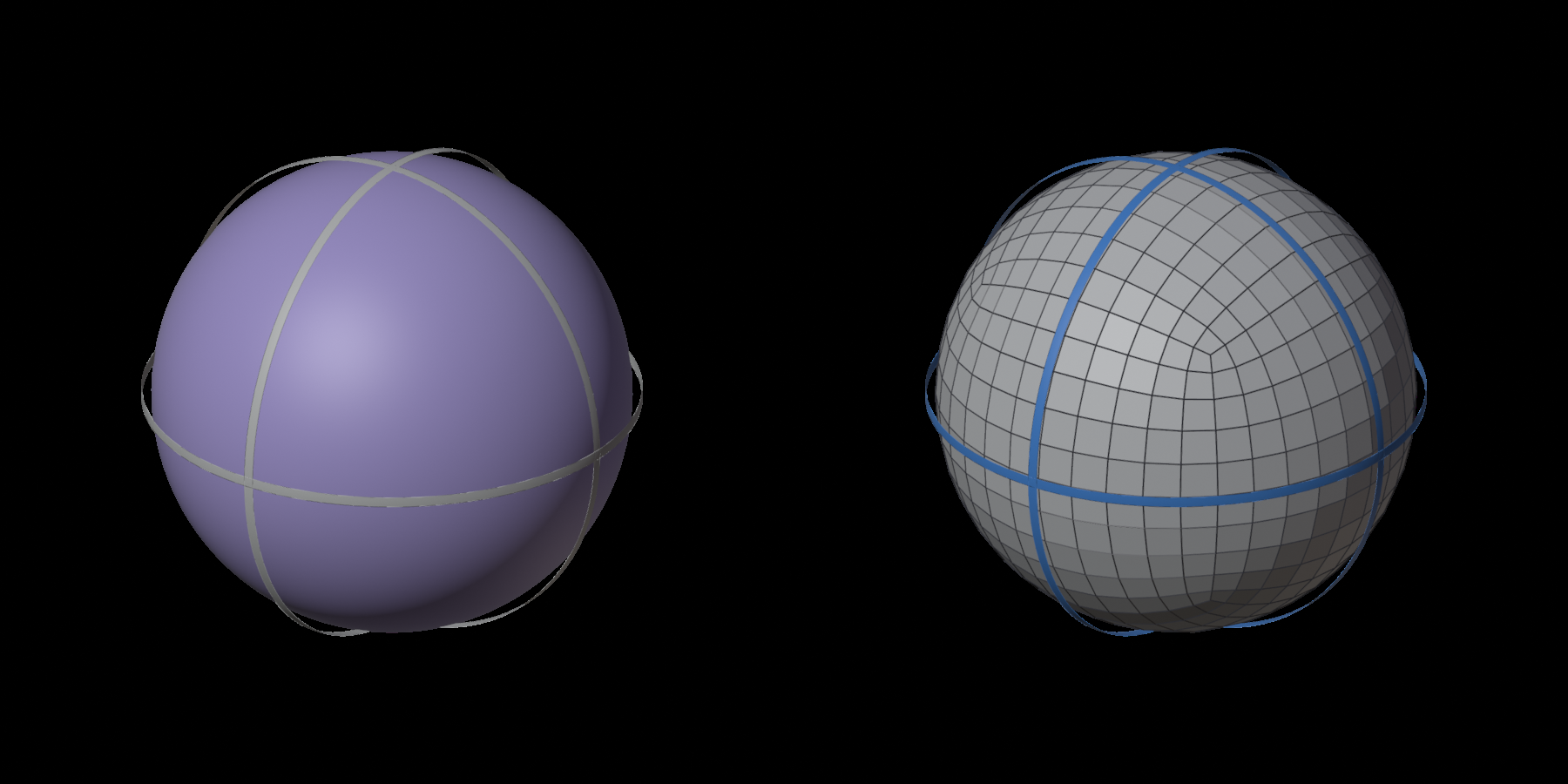
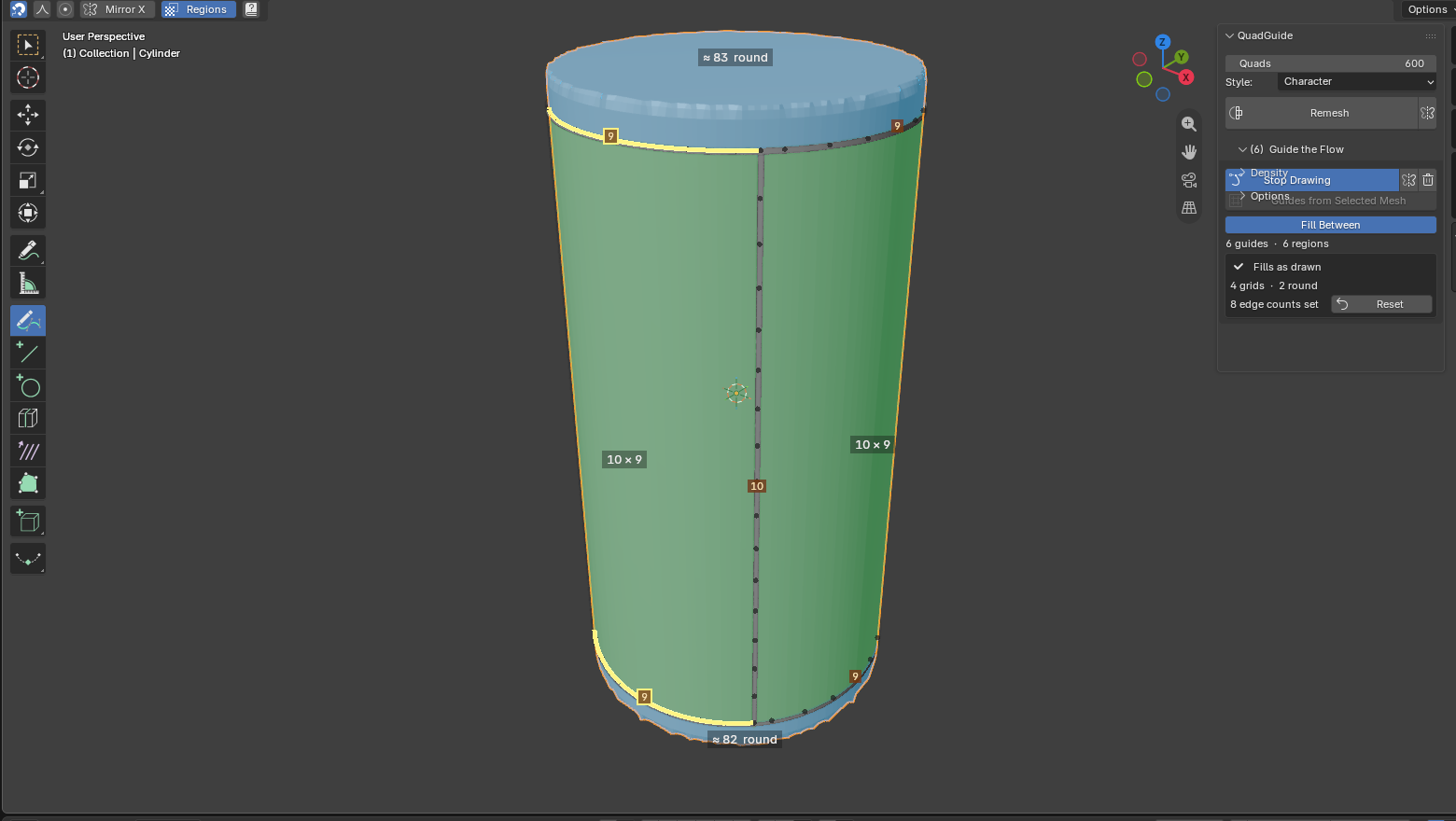
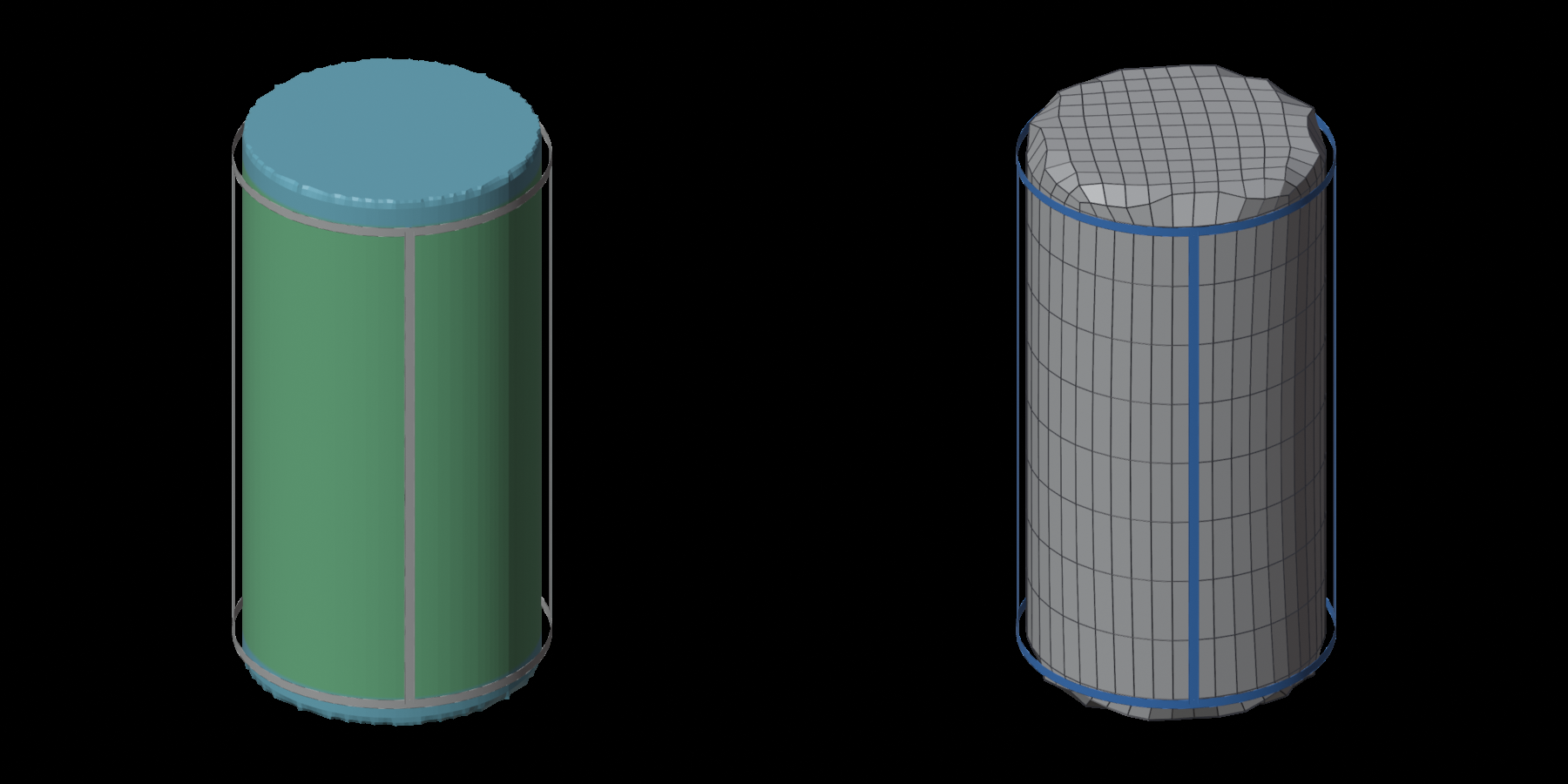
Three loops round a ball: eight patches with three corners each, 600 quads. Each three-cornered patch fills with a pole at its middle.
The work goes in a loop, and the overlay tells you at each step what the remesh will do, so you remesh only when it looks right:
- Draw the borders of the patches.
- Read the overlay: the colour of each region, the edges along each line, and a sketch of the rows.
- Fix what the panel lists, with Fix All or one button per problem.
- Set the edges along a line where the count matters.
- Remesh and read the result. Change what it points to, and Remesh again.
1. Draw the borders
Press Draw in Guide the Flow and draw with any of the guide tools. Lines that cross meet where they cross: you don't have to stop a stroke exactly on another line. Draw on past it. An end that runs up to about two quads past the line it crosses is trimmed back to the crossing, and the overlay draws the trimmed part grey. Further than that, it is a loose end.
A corner is where lines meet at a narrow angle (a T, a cross, a sharp turn), or where a line turns sharply.
You can also draw each patch as its own loop. Where two loops share a side, that side is drawn twice, a little apart. Where a line runs along an earlier one within about two-thirds of a quad, the two are taken as one side.
You don't have to cover the whole mesh. What your lines leave outside is free: it is remeshed round your patches at the asked size, in even, square quads.
2. Read the overlay
While a guide tool is active, the overlay updates with every stroke.
The colours
Each region is tinted by what it will fill as:
| Colour | Patch | Filled as |
|---|---|---|
| Green | grid (four corners) | rows straight across; opposite sides get the same edges |
| Purple | pole (three or five corners) | a grid with one pole inside |
| Blue | round: a disc, or a ring between two loops | rings in to a centre; or rows round the inner loop |
| Orange | stretched (a grid one of whose sides is over twice its opposite) | as a grid, its quads drawn out: split it or even it up |
| Orange | uneven (a ring far wider in places than in others) | one row count all round, so the rows crowd where it is narrow and stretch where it is wide: move its loops so they run parallel |
| Red | add a line | cannot be one patch: a dent, too many corners, two holes, a loose end |
| Grey | free | the rest of the mesh round your patches, remeshed at the asked size |
| Dark | opening: cut out | the inside of an opening, left out of the remesh |
The edges along each line
Each piece of line between two junctions (a span) shows a small number: how many edges the remesh gives it. You can change it: see step 4.
The sketch
Thin dark lines inside the grids, pole patches and rings sketch the rows of quads each will get, from the edges on its sides. A ring shows its rows round the inner loop and the spokes across. You see the flow before you remesh: rows that bunch up or run crooked in the sketch will in the result too.
It is a sketch, not the result: the remesh relaxes the rows, and it also fills the discs and the free rest, which the sketch leaves out. Sketch in the tool header turns it off; Regions turns off the tint.
Too close
Two lines that come within about one and a half quads of each other without meeting leave room only for slivers between them. The overlay rings each such place in orange, marked too close: join the lines there, or move one away. Lines that run side by side on purpose (a loop just inside another) are not marked; the ring between them fills with rows.
On a dense sculpt
On a mesh of hundreds of thousands of faces, the overlay works on a lighter copy of it, made in the background the first time you draw (about ten seconds for 1.6 million faces). Until it is ready the overlay is empty, but you can draw. After that, it keeps up with each stroke. The remesh always uses the full mesh.
3. Fix what the panel lists
When something keeps your drawing from filling as drawn, a box under Fill Between says what, with a button that fixes it. Fix All at the top applies every fix at once; one Ctrl+Z undoes it. Nothing in your drawing changes until you press one.
- N regions need a line: draw a line across each red region, from corner to corner, until it turns green or purple. This one is yours to draw: only you know where the line should go.
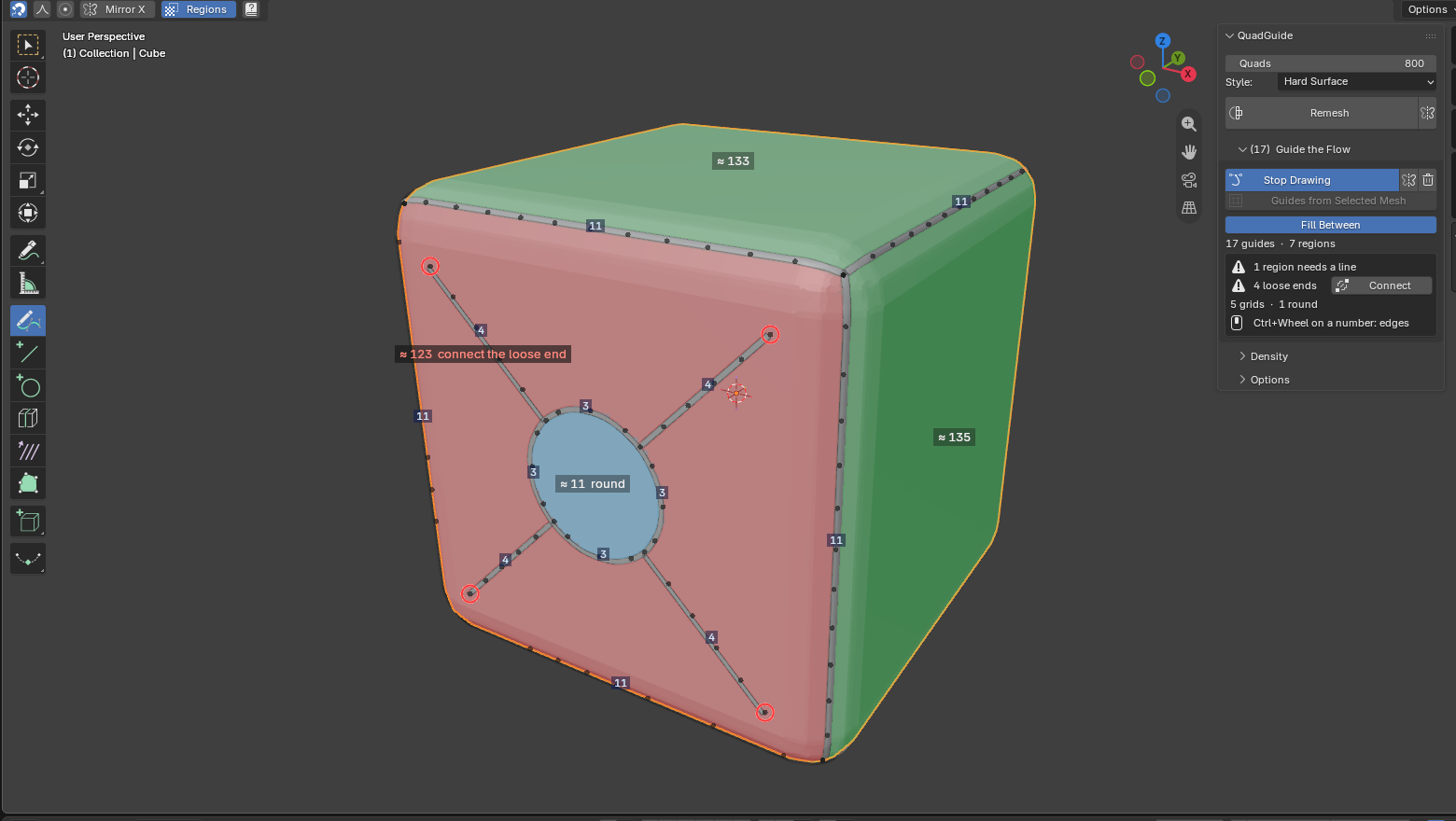
- N loose ends · Connect: a line that stops short of the others leaves its region open. The red ring marks each loose end, and Connect runs each one on to the line or junction ahead of it.
- N loops cut in two by a line · Free: a line runs across a loop from side to side, such as a mouth's seam drawn on to the lips loop. Each half then fills on its own, with poles at the corners and no rows round the mouth. Free stops the line a quad short of the loop (short bits outside it go) and makes the loop smooth, so the rows run round the loop and the line inside it.
- N places where lines nearly touch · Part: see Too close. Part gives one of the two lines a point there: under a quad apart it goes on to the other line, so they meet; further apart it and the line round it move away, to a quad and a half. It moves whichever of the two keeps clear of your other lines, and leaves alone a place where three lines come together (which two should meet is yours to say).
- N edge counts set · Reset: the counts you set on lines (step 4); Reset lets the remesh choose them again.
No box: every region is a patch, ready to remesh.
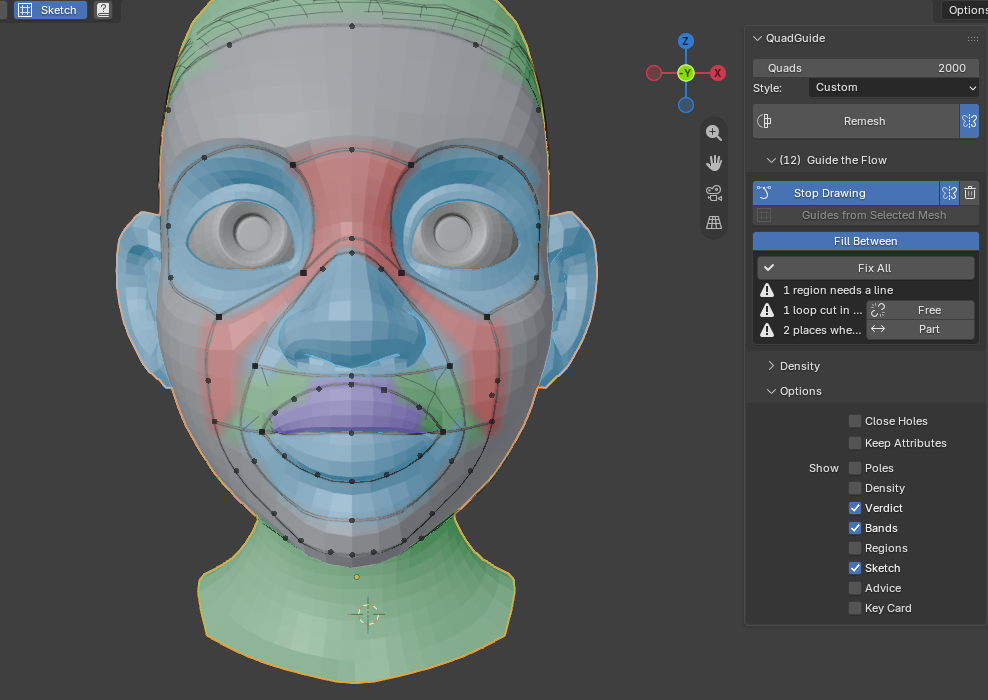
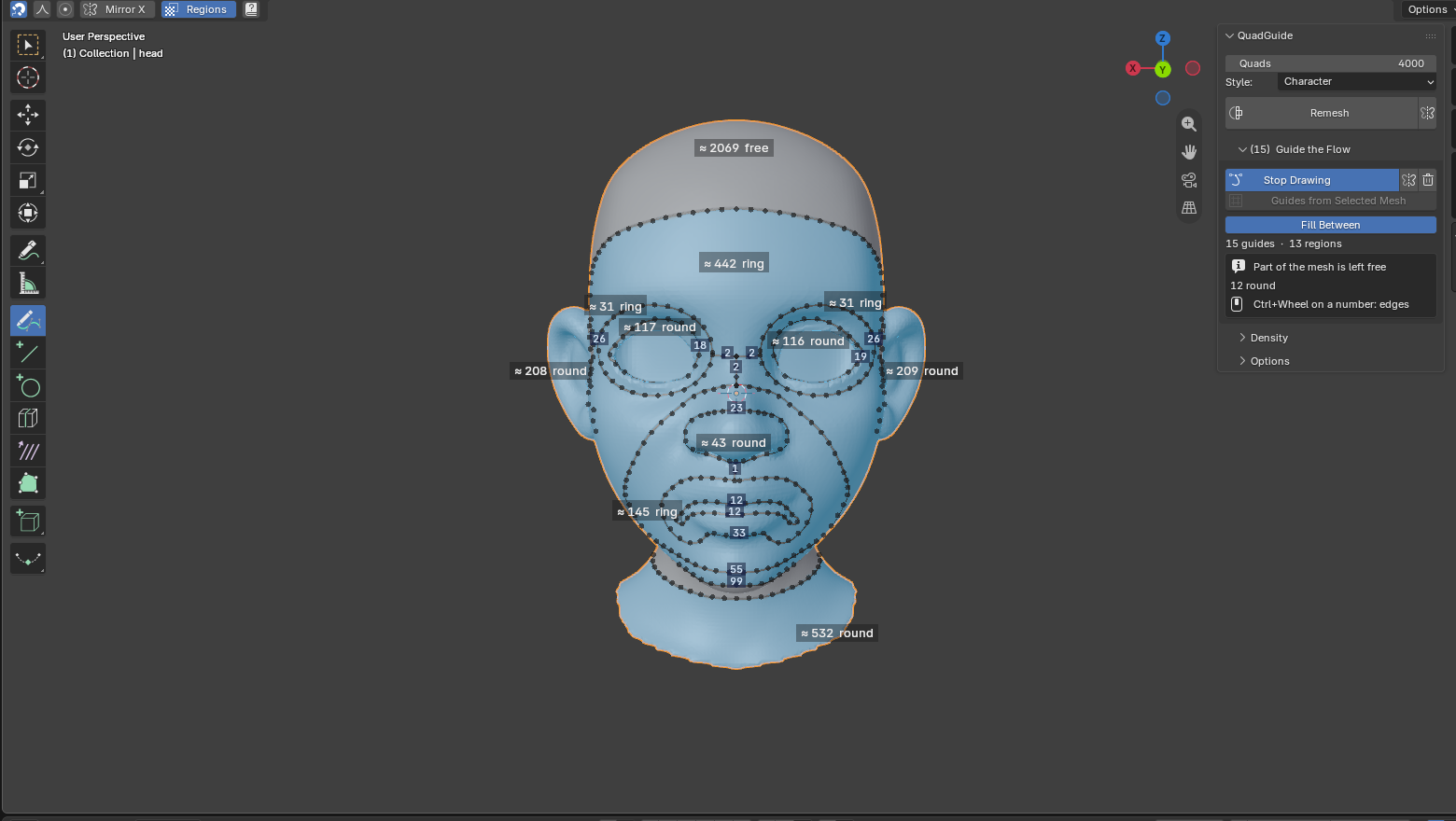
A face drawn as loops. The red regions (forehead, cheeks) need a line; the box says so, and lists a loop cut in two by the mouth's seam and two places where lines nearly touch.
| Loose ends (red rings) | After Connect |
|---|---|
 |
 |
4. Set the edges along a line
The remesh chooses the counts from the size you asked for. Where a count matters (a wrist and a cuff that must match, a loop for a later bevel), put the mouse over the span's number and:
- Ctrl + wheel, or the + / − keys: one edge more or fewer.
The count goes on across each grid to the side opposite, and on through the grids beyond, so that a grid stays a grid. Everything it will change lights up while the mouse is over the number, and the sketch follows. With Mirror X on, the same spans on the other side change too. Counts you set are drawn orange; Reset in the box lets the remesh choose them all again.
5. Remesh and read the result
Press Remesh. The result line says how your patches were used:
- No word about patches: every region was filled as drawn.
- "your patches were used, except N region(s) remeshed freely at the asked size": a region or two were far too big for their outline (the back of a head inside one face loop) and were remeshed on their own, joined to the patches round them (Expert setting Fill Open Regions). To have patches there too, draw lines across them.
- "your patches were not used: the fill between your lines failed in N place(s), marked red": the patches came out folded or pinched there, so the remesh made a free mesh that your lines steer, following them only roughly. You still get a clean mesh, but not your layout. Look at the red marks: usually two lines too close, a corner far from square, or a patch that bends round a deep fold (a lip, a nostril). Move or add a line there and Remesh again. The marks go when you next edit a guide.
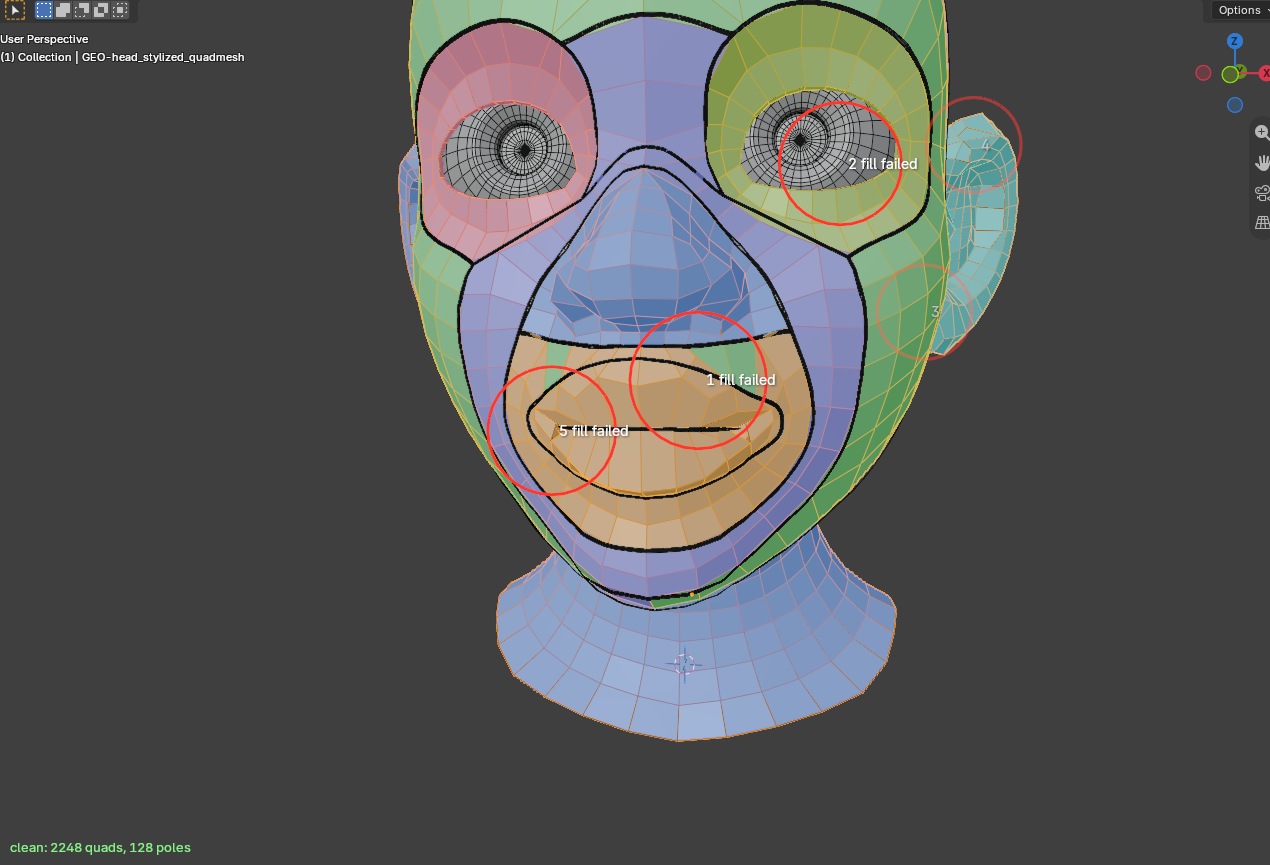
"Your patches were not used": the mesh is clean (bottom left), but it is the free remesh. The red rings mark where the patches failed: at the mouth, where the lips patch reaches into the crease, and beside the eye.
- "your patches were not used: a region is far bigger than its outline can fill": as above, but because of one big region. Draw lines across it.
- "N opening(s) close nothing off" (a warning as the remesh starts): a loop marked as an opening has no inside behind it, so nothing is cut there.
After a remesh with guides, the Notes section at the bottom of the panel lists what the engine had to change in your drawing, such as a line it added to close a region.
Openings
On many base meshes the mouth is more than a seam: behind the lips the mesh goes on inward, into the inside of the mouth. A nostril or an ear canal is the same. A loop round such a place holds the whole inside as well as the lips, and no patch can fill that: the remesh falls back to a free one.
Mark the loop where the surface turns inward as an Opening. Select it and press Opening in the panel (the button shows while a loop is selected), or right-click, Quad Guides, Opening. Press it again to unmark it. With Mirror X on, its mirror partner changes with it.
When you remesh, what the opening closes off is left out: the inside is cut away at the loop and the hole closed over, so the remesh sees a closed mouth. The patch round the opening (the lips) fills across it, with its rows round the mouth. Your mesh is not changed, only the copy the remesh works on.
- Draw the opening where the lips meet, on the outside: a thin loop round the seam, about a third of a quad off it on each side, round the mouth corners. Draw no other line inside it.
- Draw the lips loop round it as usual, a couple of quads out.
- In the overlay, the inside of the opening turns dark and is labelled opening: cut out. If it does not, the loop closes nothing off (there is no inside behind it), and the remesh says so and cuts nothing.
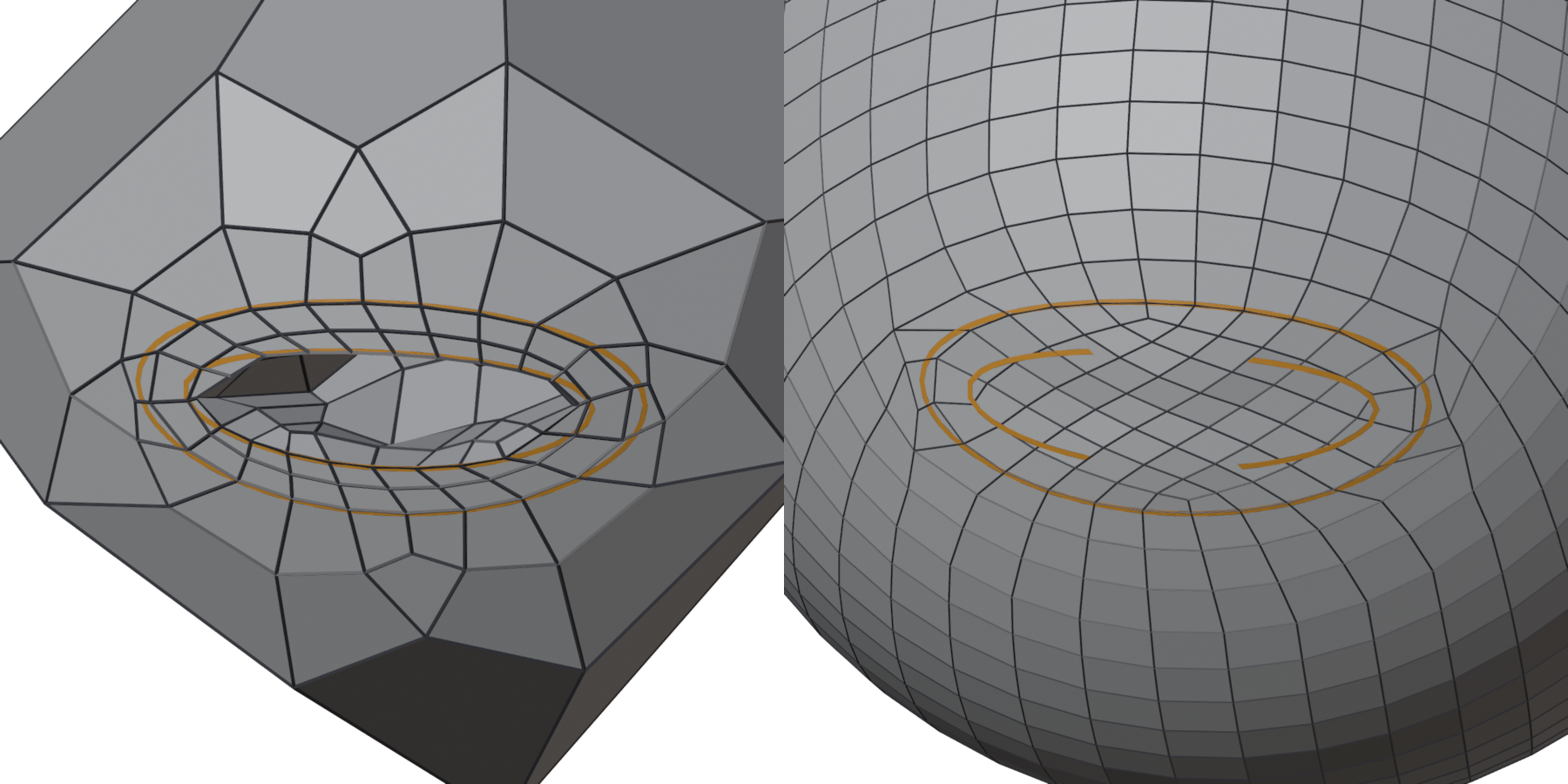
A ball with a slit mouth and a pocket behind it, a lips loop and a loop at the rim. Left: unmarked, the fill fails and comes out torn. Right: the rim loop marked as an opening, the patches are used, 1901 quads, closed, the rows running round the mouth.
A face
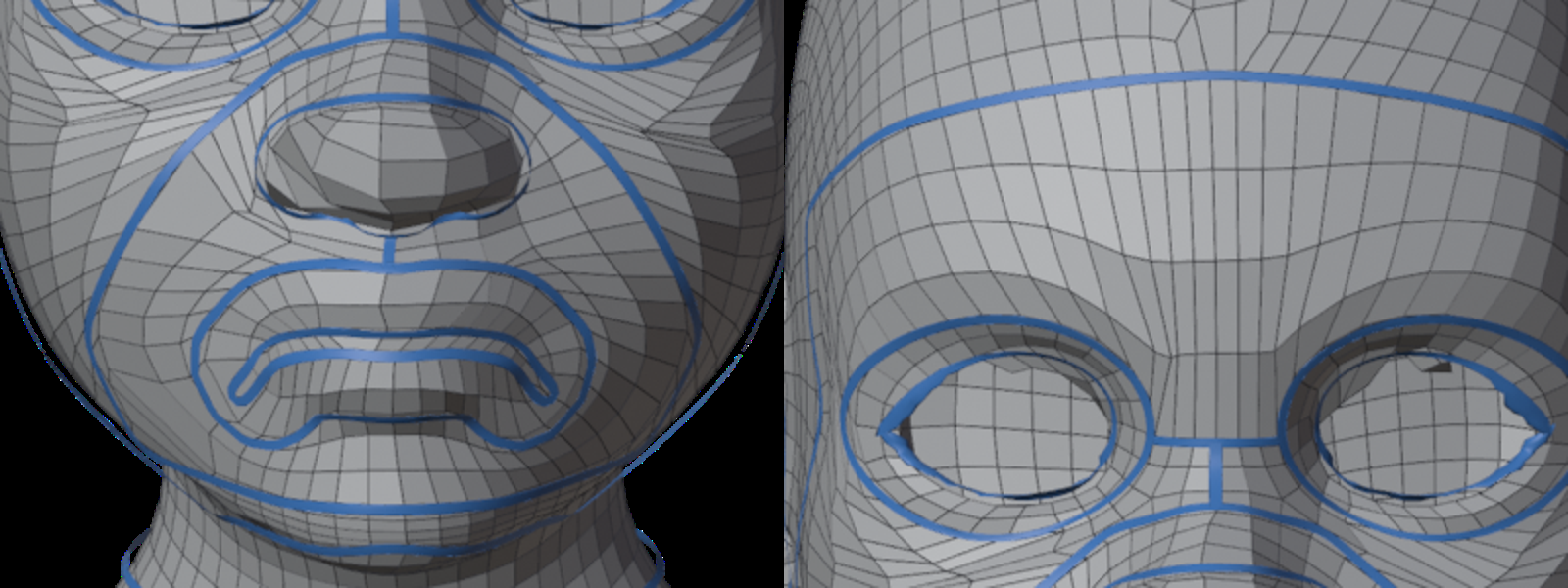
Hand-made head retopology works in loops: a loop round each eye with the eye opening inside it, a loop round the lips with the seam inside it, a loop round the nose and mouth, and the face's outline. Loops that sit side by side are joined by one line each: across the bridge of the nose between the eyes, down from there to the nose-and-mouth loop, and from the nose to the lips. Then every space between the loops is one ring, and its rows run round the loops inside it.
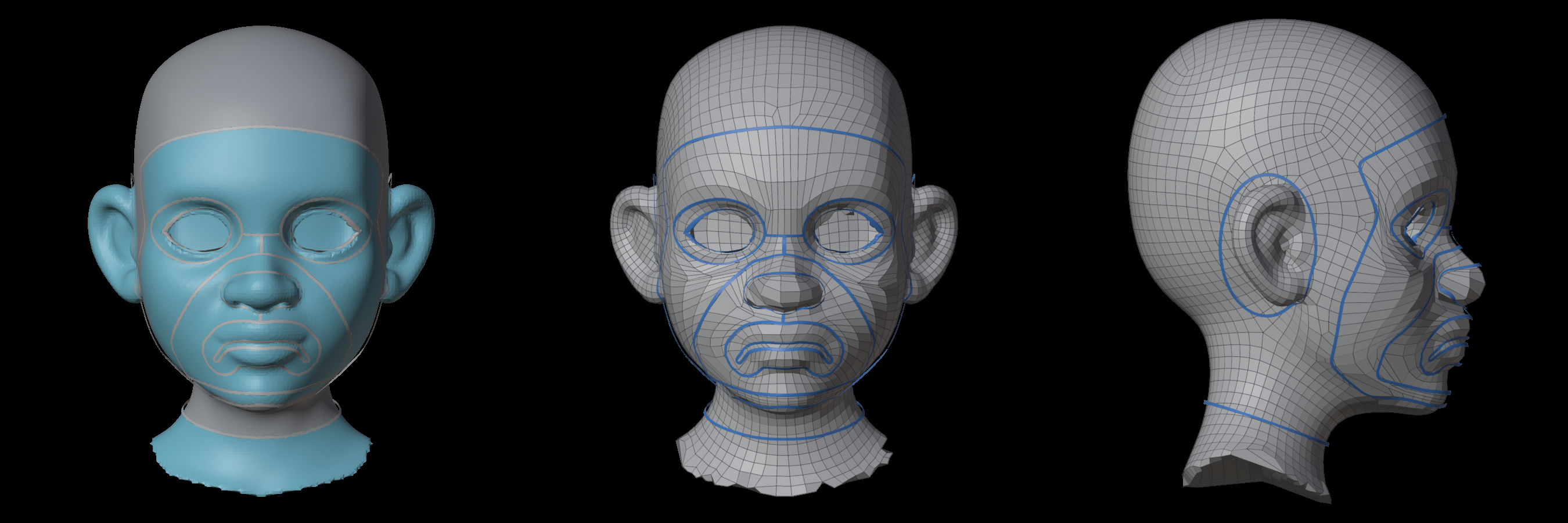
Tips for a face:
- Turn on Mirror X and draw one side.
- Draw the lips loop the shape of the mouth, a couple of quads out from the seam all round, smooth (no sharp points). Draw the seam inside it, stopping about a quad short of the loop at the mouth corners: a line that meets nothing is a slit, and the rows run round it. If the seam runs on to the loop, the upper and lower lip become two separate pieces; Free in the box undoes that.
- If the head has the inside of a mouth behind the lips, as many base meshes do, draw a thin loop where the lips meet and mark it as an opening, in place of the seam. Check the mouth corners after the remesh: a quad or two there may need a touch-up.
- Keep the loops at least a quad and a half apart where they pass each other. The too close rings show where they are not.
- The outline of the face should pass clear of the ears.
- Keep the ring between the face outline and the loops inside it about as wide all round. If the outline runs close by the eyes and wide of the cheeks, the cheeks stretch. The overlay marks such a ring uneven. Lines across it rarely help: they tie the edge counts of the pieces they make.